Welcome to the Juniper Pack Guide — your go-to resource for understanding how API fields map to the packs your customers receive. This guide will help you visualize how data flows into the final product, ensuring a smooth, consistent, and high-quality experience for every customer.
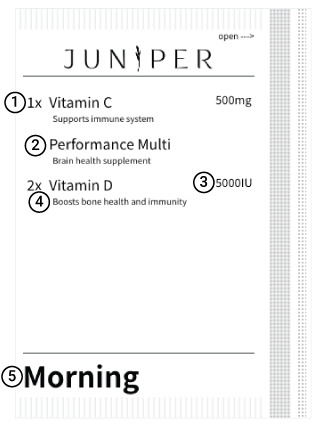
Here's a breakdown of how each part of the pack is powered by your API data:
Pill Quantity
- Displays the number of supplements included in the pack.
- Maps to
quantityin the Order schema's lineItems.
Product Name
- Pulled directly from the product name in the Juniper catalog.
- Maps to
namein the Product schema.
Supplement Dosage
- Shown only if the supplement contains a single active ingredient.
- Derived from the SupplementFactsPanel
ingredientInformation.
Supplement Description
- A customizable field that explains the purpose of the supplement or provides dosing instructions (e.g., "Take with food").
- Maps to
packDescriptionin the Order schema's lineItems. - Required for pack items, optional for external items (powders, liquids).
Time of Administration
- Indicates when the supplement should be taken: Morning, Afternoon, Evening, or Sleep.
- Maps to the Administration object within the lineItems.
- Note: The sum of
morning + afternoon + evening + sleepmust equal the line itemquantity.